

Download Librarian Pro – Personal Inventory Software, Free & Secure Management
Overview: What Is Librarian Pro?
Librarian Pro is a complete personal inventory system designed for anyone who wants to keep track of books, movies, games, music, or any other collectible items in a single, easy‑to‑use application. While the software is still in a pre‑release stage, it already showcases a flexible architecture that lets you create, edit, and organize collections with a few clicks. The core idea behind Librarian Pro is to replace paper lists, scattered spreadsheets, and forgotten sticky notes with a modern, searchable database that lives on your desktop and syncs to the web when you need it.
One of the most compelling aspects of Librarian Pro is its smart‑collection engine. You can define rules based on author, genre, borrowing status, or any custom field, and the program will automatically populate those collections for you. This makes it effortless to see, for example, “All sci‑fi novels borrowed this month” or “Movies I own on DVD but not on Blu‑ray.” The UI is clean and responsive, allowing you to switch between grid and list views, adjust column visibility, and even export your data in formats that are ready for publishing on a personal website or transferring to an iPod.
Despite a few stability quirks—such as occasional hiccups when importing or exporting large CSV files—Librarian Pro remains a powerful tool for collectors who value up‑to‑date information and quick access to item details. The application can pull metadata from popular online sources, fetch album covers, and even display your Amazon shopping cart inside the program, giving you a unified view of what you own and what you plan to acquire. With a new feature that lets you sort the borrowers list alphabetically, keeping track of who owes you a book has never been easier.
Key Features and Smart Collections
- Customizable smart collections based on any field (author, genre, borrow status, etc.)
- Import from multiple sources: Address Book, online databases, CSV files, and more
- Export options for web publishing, iPod syncing, and printable reports
- Integrated Amazon cart view and automatic retrieval of album covers
- Alphabetical sorting of the borrowers list for quick reference
- Drag‑and‑drop layout editor for personalizing list appearance
- Search‑as‑you‑type global search across all collections
- Secure local storage with optional encrypted backup
The feature set of Librarian Pro is built around the principle of “one‑click organization.” By defining a smart collection—say, “All items borrowed by John”—the software continuously monitors the underlying data and updates the collection automatically whenever you add or return an item. This eliminates the need for manual list maintenance and ensures that your inventory is always accurate.
Import capabilities are another strong point. Librarian Pro can read address book entries to create borrower profiles, pull book metadata from ISBN databases, and scrape details from popular sites such as Goodreads or IMDb. Even if you have an existing spreadsheet of your collection, the CSV importer will map your columns to the program’s fields, letting you migrate without losing any information. The export wizard lets you choose between HTML, CSV, or plain text, and you can set up custom templates that include cover images, ratings, or personal notes.
For users who love to share their collections online, the “publish to web” feature generates a responsive HTML page that you can upload to any hosting service. The page respects your chosen layout, includes sortable columns, and automatically updates whenever you make changes in Librarian Pro. Mobile enthusiasts will appreciate the iPod sync option, which creates a lightweight library file that can be read by popular media players on iOS devices.
Installation, Usage & Compatibility
Step‑by‑Step Installation
Installing Librarian Pro is straightforward. First, visit the official download page and click the “Download for Windows” or “Download for macOS” button, depending on your operating system. The installer is a signed executable (Windows) or a DMG package (Mac) that guides you through the standard setup wizard: accept the license agreement, choose an installation folder, and optionally create a desktop shortcut. After the installation finishes, launch Librarian Pro from the start menu or the Applications folder.
On first launch, the program presents a welcome wizard that helps you configure basic settings: default language, preferred import format, and backup location. You can also choose whether to enable automatic updates—a secure feature that checks the vendor’s server for new releases and prompts you to install them without leaving the application.
Getting Started with Your First Collection
Once inside the main window, click the “New Collection” button to start a library. You’ll be asked to name the collection (e.g., “My Books”) and select a template that matches the type of items you plan to store. Templates include predefined fields such as Title, Author, ISBN, Publisher, and Borrower. After the collection is created, you can add items manually by clicking the “Add Item” icon or import a batch of records using the “Import” menu.
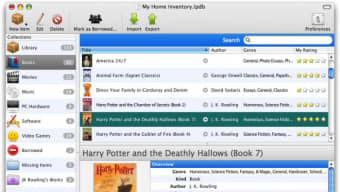
The UI is divided into three panes: a navigation tree on the left, the item list in the center, and a detail view on the right. Use the navigation tree to switch between collections, smart collections, and the borrowers list. The item list supports column resizing, sorting, and inline editing, while the detail view shows full metadata, cover art, and any notes you have attached. To create a smart collection, select “New Smart Collection” from the toolbar, define your rule set (e.g., “Genre = ‘Fantasy’ AND Borrowed = false”), and save. The collection will populate instantly and stay current as you edit items.
Compatibility
Librarian Pro runs on the latest versions of Windows (10, 11) and macOS (Big Sur, Monterey, Ventura). The application is built with a cross‑platform framework, so the core functionality is identical on both operating systems. While a mobile app is not yet available, the program can export libraries to formats that are readable on iOS and Android media players, making it a flexible solution for users who want to access their inventory on the go.
Minimum system requirements include a 1 GHz processor, 2 GB of RAM, and 200 MB of free disk space for the application itself. For larger collections (10,000+ items), a modest SSD and at least 4 GB of RAM are recommended to keep search performance snappy. The software supports both 32‑bit and 64‑bit environments, but the 64‑bit version is preferred for better memory handling.
Pros, Cons, and Frequently Asked Questions
Pros
- Highly customizable smart collections that update automatically.
- Robust import/export options, including direct pulls from online databases.
- Integrated Amazon cart view and automatic cover‑art retrieval.
- Secure local storage with optional encrypted backups.
- Responsive web publishing and iPod sync features.
- Free basic version with optional paid upgrades for advanced features.
Cons
- Pre‑release version may experience occasional crashes during large imports.
- No native mobile app yet (reliant on export for mobile use).
- Limited built‑in reporting templates; custom reports require manual setup.
- Some users report slower performance on very large libraries (>20,000 items).
Frequently Asked Questions
Is Librarian Pro free to download and use?
Yes, Librarian Pro offers a free version that includes all core inventory features. A premium license is available for users who need additional templates, priority support, and cloud backup options.
Can I import my existing spreadsheet of books?
Absolutely. Librarian Pro supports CSV import, allowing you to map your spreadsheet columns to the program’s fields. The import wizard guides you through the process step by step.
How does the software keep my data secure?
All data is stored locally on your computer in an encrypted SQLite database. You can also enable optional encrypted backups that are saved to an external drive or cloud storage of your choice.
Will Librarian Pro run on Windows 7?
The official system requirements list Windows 10 and later. While the application may launch on Windows 7, you may encounter compatibility issues and it is not officially supported.
Can I sync my library across multiple computers?
Librarian Pro does not include built‑in cloud sync, but you can place the database file in a folder synchronized by services like Dropbox, OneDrive, or Google Drive to achieve multi‑device access.
Librarian Pro shines as a versatile inventory manager for collectors who need a dynamic, searchable library. The smart‑collection engine and robust import capabilities set it apart from basic spreadsheet solutions. While the pre‑release status introduces occasional stability hiccups, the overall experience is polished, and the free version offers enough power for most hobbyists. For power users, the premium upgrade unlocks advanced reporting and cloud backup, making Librarian Pro a long‑term companion for any personal collection.
Conclusion & Call to Action
In summary, Librarian Pro delivers a comprehensive, user‑friendly solution for anyone looking to digitize and organize personal collections of books, movies, games, music, or any other items worth cataloguing. Its smart‑collection system, extensive import/export options, and seamless integration with online services make it a standout choice in the crowded inventory‑software market. Even though it is still a pre‑release product, the developers have shown a clear commitment to fixing bugs and adding features based on community feedback.
If you are tired of juggling handwritten lists, scattered Excel files, and forgotten borrowing records, downloading Librarian Pro today will give you immediate control over your assets. The free version provides all the essential tools to get started, while the optional premium license offers extra power for advanced users. Simply click the download button below, install the application, and begin building your smart collections in minutes.
Download Librarian Pro now and experience a more organized, efficient way to manage your personal inventory. Stay tuned for future updates, as the development team promises regular enhancements, bug fixes, and new features that will keep Librarian Pro at the forefront of personal library management.







